AI & Intelligence
Google Client includes an optional AI layer that helps people understand documents without leaving Salesforce — and without opening them.
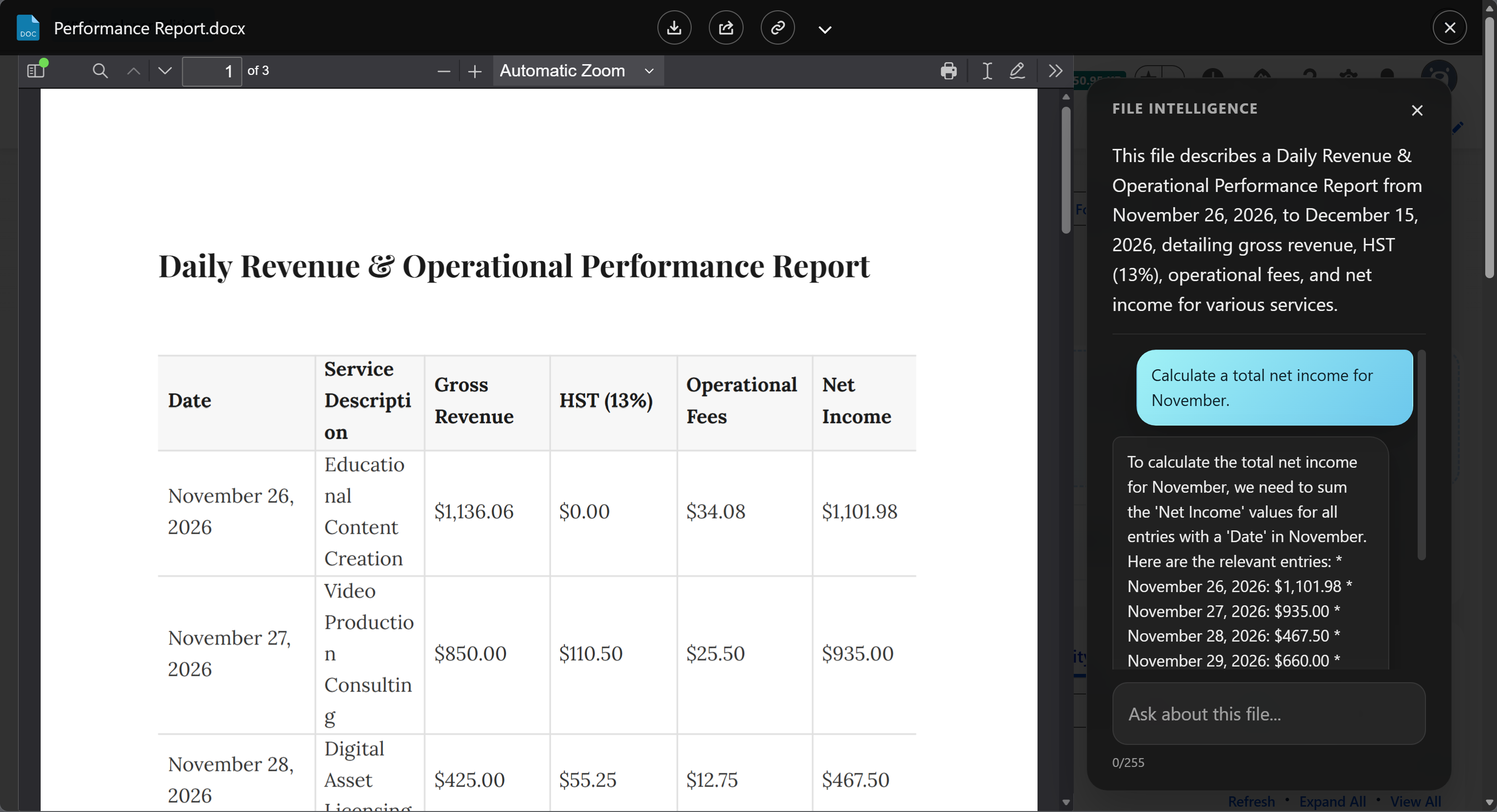
It does three things: it writes a short summary of every file, it answers questions about the file a user is looking at, and it can label each new file with one of your Google Drive labels.
What It Adds
-
A short description of what each file contains, generated in the background and stored in Salesforce, so users can tell files apart from a list.
-
Ask a question about the open document and get the answer in the preview window, instead of reading the whole file to find one clause.
-
Describe each Google Drive label in plain language and let Google Client apply the best match to every new file, or leave it unlabeled when it is not sure.
How It Works
Google Client analyzes a converted copy of the file rather than the original upload, which is how a Word document, a spreadsheet, and a PDF can all be handled the same way. The original file in Google Drive is never modified.
Summaries and labels are generated in the background after an upload, so nobody waits for them. Questions are answered on demand while the preview is open.
Everything goes to the AI provider you configure, in your Google account, and nowhere else. Google Client does not run a model of its own and does not route content through any third party.
What Is Protected
Every question is inspected before it leaves Salesforce, and every answer before it is shown. This protects against attempts to talk the model out of its instructions — asking it to ignore its rules, reveal its configuration, or answer about something other than the open file — and against answers that leak a credential or invent personal data.
The protection is on from the moment File Intelligence is enabled, at a Standard strictness that suits most organizations. It can be tightened, loosened, or replaced with your own Apex implementation.
📘 See AI Prompt Security for the modes and the extension point.
Choosing a Provider
| Gemini Developer API | Agent Platform | |
|---|---|---|
| Authentication | An API key from Google AI Studio | The service account already used for Drive |
| Google Cloud project | Not required | Required, with billing active |
| Best for | Development, sandboxes, internal evaluation | UAT and production |
Both provide the same features. Agent Platform is the stronger enterprise fit because it puts AI usage under the same Google Cloud project controls, billing, and audit as the rest of your integration.
It Is Optional
The core Google Drive experience does not depend on AI. Upload, preview, download, sharing, public links, folder structure, file reuse, and versioning all work exactly the same when File Intelligence is disabled or was never configured — the AI controls are simply not shown.
Where to Go Next
- Configure AI & Intelligence — connect a provider
- AI Intelligence settings — prompts, answer length, and labeling
- Safety & Customization — the safety mode setting